Track Changes for spreadsheets
See who changed what with cell-level attribution and materiality filters.
Explore track changes
17 versions. Nobody knows which is right. Now you do.
Full history, full context, one source of truth - for Excel and Google Sheets.
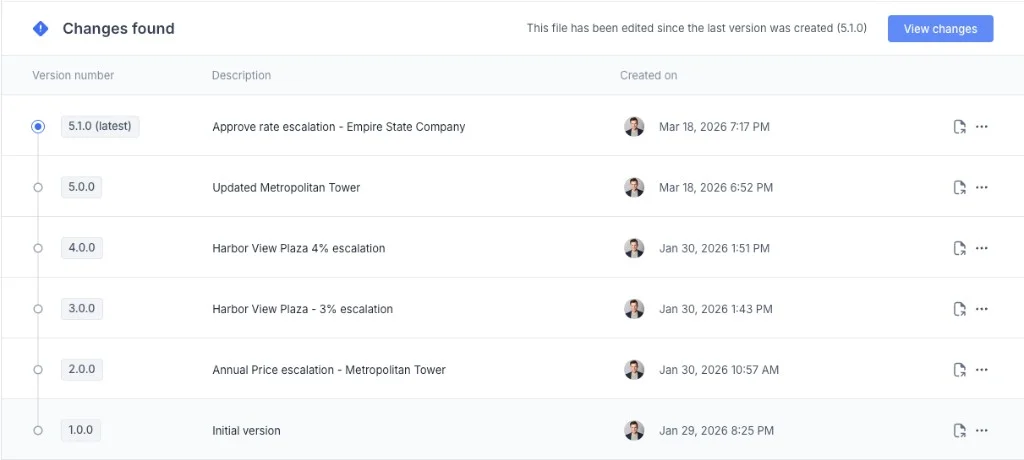
Excel and Google Sheets ship with a video game timestamp. That's not version control.
It doesn't tell you what changed, why, or who did it - and your drive is a wall of files with zero
context to choose between them.
Two people. Two copies. One of them is wrong. Nobody knows yet.
Auto-save logs when a file was touched. It doesn't log what changed, who changed it, or why. You're left forensically opening old versions one at a time hoping you recognize the right one.
Revenue_Model_FINAL.xlsx
Revenue_Model_FINAL_v2.xlsx
Revenue_Model_FINAL_v2_JM.xlsx
Revenue_Model_USE_THIS_ONE.xlsx
Close is in 4 hours. Your colleague sent you a file. Is it the same version you were working from? Did they update the assumptions? You can't tell without opening both and comparing cell by cell.
"Is this the one with the updated SOFR rate?"
"Which version did we send to the CFO?"
"Someone saved over the approved model."
Your team is working simultaneously. Comments live in email. Reviews happen in meetings. Changes happen in files. Nobody has the same picture of what the current model actually says.
Comments: email thread (47 replies)
Reviews: Monday standup
Changes: 6 different local copies
The approved model from last quarter exists somewhere. It might be in SharePoint. It might be on someone's desktop. It might have been overwritten. "Just revert it" is not a real option without version control.
"The CFO wants the Q2 approved model."
"That was the one before the restructuring..."
"I think Sarah has a copy."
Automate context. Align the team. Always work from the right file. Rockhopper brings enterprise-grade spreadsheet version control into Excel and Google Sheets — without making finance teams learn how to code. Full audit trail for SOX compliance and financial reviews.
“Version control and collaboration in Excel are very poor. Rockhopper solved that in a way no other solution we evaluated could. The fact that we can stay in Excel while gaining real control and visibility is exactly what we needed.”
Carlos Olea
Chief Financial Officer
Howard Hughes Holdings Inc.

Every save gets a structured context snapshot — who saved it, what changed, and a plain-English summary of the key deltas. The latest file always surfaces automatically.
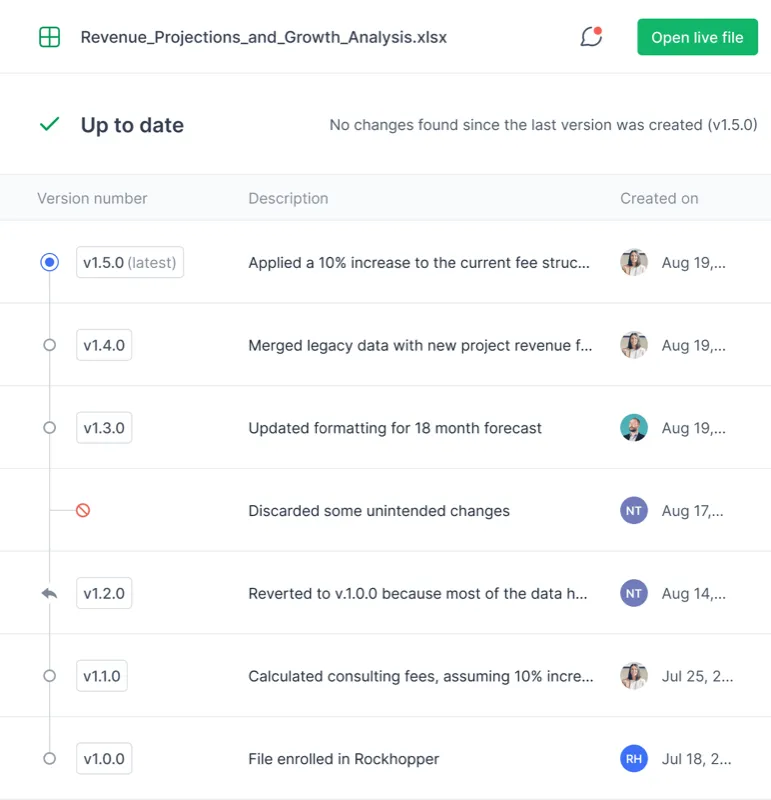
Every version is retained indefinitely. Scroll back to any point and restore it in one click. Lock approved versions as templates so future models inherit the right structure. Real spreadsheet version control means every version is findable, labeled, and one click away.
Every comment, review note, and approval is anchored to the version it belongs to — not floating in an email thread. Your whole team sees the same picture.
Rockhopper produces a structured context snapshot every time a file is saved — so you never have to forensically open old versions again.
Rockhopper retains every version indefinitely with full context — so you can scroll back to any point in a model's history and restore it instantly.
Related resources
Keep exploring with practical guides, product pages, and proof points for your evaluation process.
See who changed what with cell-level attribution and materiality filters.
Explore track changesCompare spreadsheet-native controls against generic project workflows.
View comparisonSee how an enterprise finance team scaled alignment with version control.
Read case studyRockhopper gives every version context, every team member alignment, and every model a complete history — automatically.
Request a demo