Spreadsheet version control
Tie collaboration to version lineage so every discussion has precise context.
Explore version controlRockhopper brings every comment, review question, and sign-off back into the spreadsheet so finance teams can close with clarity.
“We used to have a 47-reply email thread to review one assumption. Now the conversation lives on the cell. The CFO asked who reviewed the revenue model and we showed the thread in 10 seconds.”
Dustin Ferrell
Controller
Rockhopper customer
Review happens everywhere except the spreadsheet. Comments in email, questions in chat, markups in meetings, approvals on calls. Critical finance review workflows become disconnected and impossible to reconstruct.
A reviewer flags a key assumption. The question moves to a long email chain. By resolution, people are acting on different versions of the answer.
"Did anyone reply to Sarah's question about the headcount ramp?"
Native spreadsheet comments show text, but not full review context. You cannot see version lineage, response history, or whether the issue was resolved.
"This comment says fix this."
"Was it from Q2?"
"Is it still open?"
Teams leave detailed feedback on one version and continue work in another. Notes drift away from current cells, and reviewers lose trust in what still applies.
"Controller notes are from two versions ago."
"I do not know what still applies."
When leadership or audit asks who reviewed a critical assumption, teams know it happened but cannot prove it quickly with a clean evidence trail.
"We reviewed this."
"I cannot show where review lives."
Every conversation is anchored to the exact cell and version that caused it. Rockhopper replaces disconnected review workflows with one collaboration layer across Excel and Google Sheets.
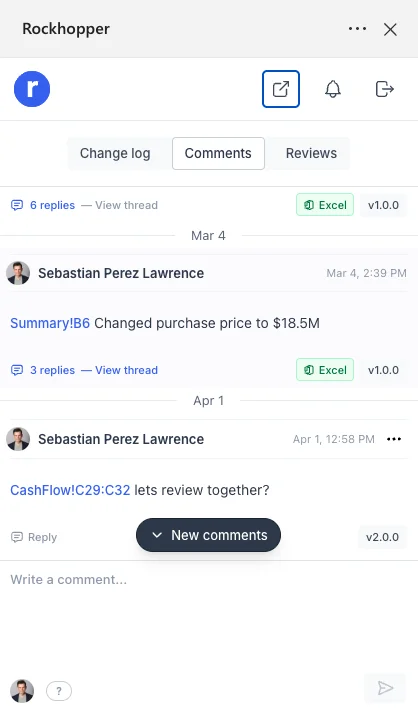
Click any cell, leave context-rich feedback, and tag teammates directly. Comments are tied to exact data points, not vague file-level threads.
Reviewers ask questions and owners answer in place. No side channels, no duplicate copies, no lost follow-ups.
Threads stay attached to version where they were created. Teams can move to new versions without corrupting prior review context.
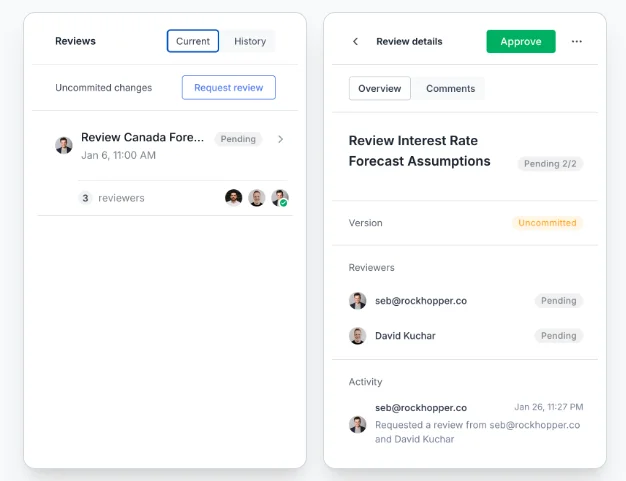
Rockhopper stores complete collaboration history so finance teams can retrieve proof of review instantly months later.
Teams review inside model with full context. Every reply remains attached to the right cell and version so collaboration stays clear as model evolves.

This is what clean close collaboration looks like when review happens inside spreadsheet instead of scattered across email and chat.
Related resources
Keep exploring with practical guides, product pages, and proof points for your evaluation process.
Tie collaboration to version lineage so every discussion has precise context.
Explore version controlSee every edit, who made it, and material impact between versions.
Explore track changesMap your current review cycle and see how Rockhopper centralizes collaboration.
Request demoRockhopper brings every comment, question, and sign-off back into model so your team always knows where review stands.
Request a demo