Version control for spreadsheets
Anchor every change inside a complete version timeline.
Explore version controlWord has it. Google Docs has it. Your financial models never did. Until now. Rockhopper is spreadsheet change tracking software that shows exactly what changed between any two versions, sessions, AI agents, or users at the cell-level.
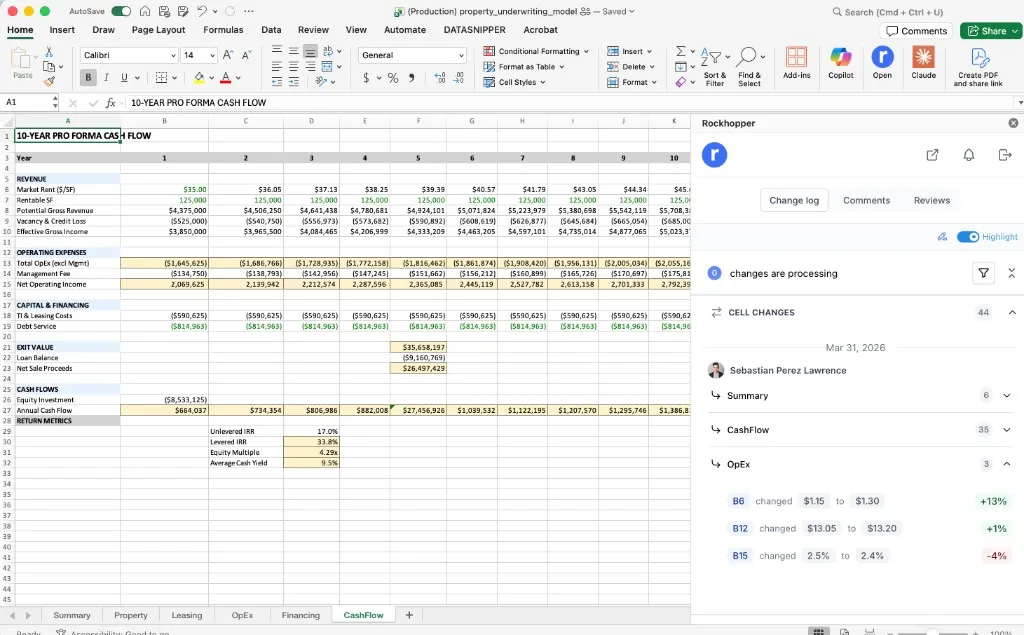
Rockhopper Excel and Google add-in showing cell-level change tracking with user attribution.
Built for teams where every number has a consequence.
The same feature, different stakes. Here's how FP&A and Capital Markets teams put cell-level tracking to work and how they track and validate critical spreadsheets and models to have greater alignment and trust.
FP&A Spreadsheet Tracker
Budget cycles, operating models, board decks
“Who changed the revenue assumption before I sent the board deck?”
Situation
CFO review in 2 hours. Revenue is $8M lower than the version you presented last week. You need the answer in 30 seconds, not 30 minutes of Excel forensics.
What Rockhopper shows
Rockhopper's Microsoft Excel Add-in highlights every changed cell directly inside your spreadsheet and surfaces a full change log with quantitative impact — so you see both where it changed and what it cost you.
Capital Markets Spreadsheet Tracker
Deal models, investor materials, live transactions
“Did anyone touch the model after I locked it for the management presentation?”
Situation
Your LBO model was locked Monday evening. The management presentation is Tuesday at 9am. You need certainty that no analyst touched the returns table overnight — before it goes in front of the CEO and the sponsor.
What Rockhopper shows
Rockhopper's Microsoft Excel Add-in flags every post-lock edit in red directly on the returns table and surfaces the full change log — including the analyst who made the edit, the exact cells touched, and the IRR impact — before anyone distributes the deck.
Four capabilities. One complete picture. Every feature in this spreadsheet change tracking software exists to answer the same question finance teams ask a hundred times a year: what exactly happened in this spreadsheet since I last picked it up?
Every change to every cell, preserved indefinitely. Compare any two versions side by side. Never lose a prior assumption, a corrected formula, or an overridden input.
Every edit is tagged to the person who made it. Not the file, not the session. Know immediately whether a change came from the Controller, a junior analyst, or an AI agent, all captured in a single Excel audit trail.
Set your own dollar or percentage threshold. Filter your change log to show only what crosses it. Stop reviewing every cell. Start reviewing the changes that actually require sign-off.
Every change carries a precise timestamp - date, time, and sequence order - feeding a complete Excel audit trail. Reconstruct exactly how a model evolved from first draft to final sign-off.
Rockhopper captures a complete cell-level diff every time a version is created: including every place a formula changed, not just a hardcoded input. So you can compare any two points in a model's history without opening both files.
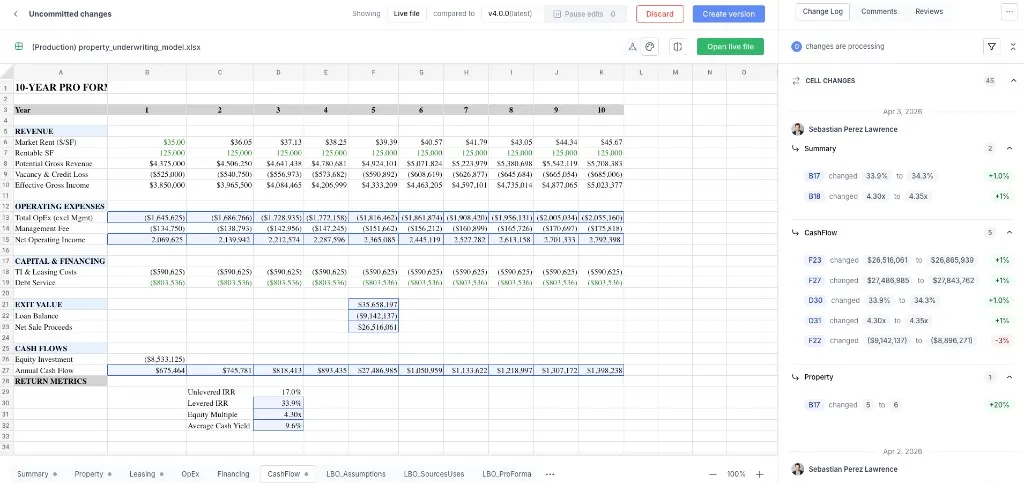
Not every change deserves a review. Set your materiality threshold — by dollar amount or percentage — and Rockhopper surfaces only the changes that cross it, so you can track and validate critical spreadsheets and models without reviewing every untouched cell.

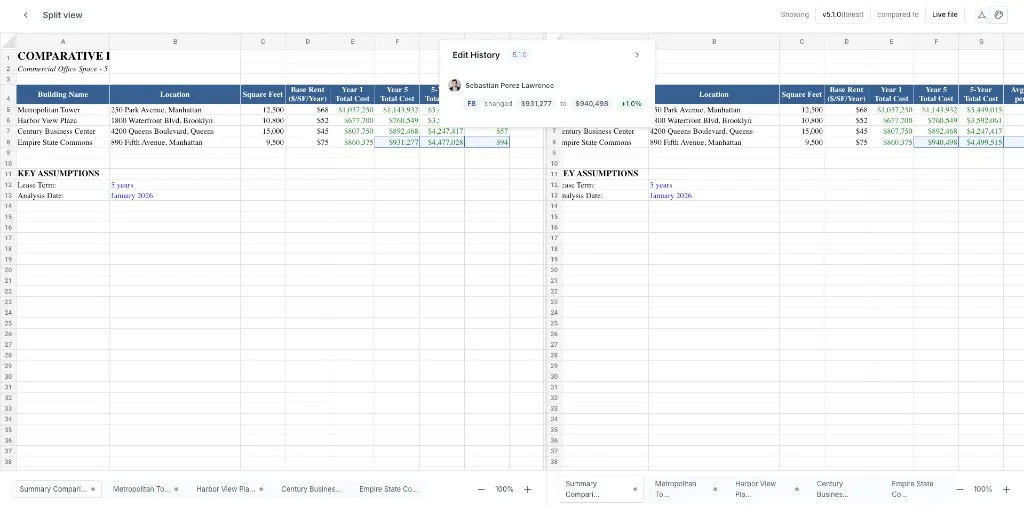
Rockhopper's split view puts two versions of your spreadsheet next to each other with every change highlighted — so you can verify edits in context without switching between files. It's the spreadsheet tracker finance teams keep open as their day-to-day Excel tracker for anything sent up the chain.
“I cannot wait for my teams to start using these features so we can save time and focus on what really matters.”
Dan Carlin
Director Of Finance
VISE
Related resources
Keep exploring with practical guides, product pages, and proof points for your evaluation process.
Anchor every change inside a complete version timeline.
Explore version controlLayer automated risk detection on top of your change history.
View AI reviewCompare finance-native cell-level tracking against generic alternatives.
View comparisonRockhopper gives every number in your model a complete, attributed, timestamped history — from first draft to final sign-off. Trust your spreadsheets.
See a live demo